Customer File
From File Maintenance, you can add or make changes to the customer record. From Program Menu>File Maintenance>Customer File. Enter in the customer’s name to list customer. If this is a new customer, select the add button to create the customer.

If the customer already exists, you can look up the customer by Name, Customer Key, Driver’s License or Customer Number. You can also look up a customer by the following criteria:
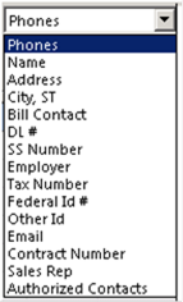
Field Search
Allows you to select from the drop-down menu, certain search fields to look up a customer. You can also enter a name into the Containing field to search of any customer that may contain any part of the name either in the beginning, middle or end of the description.
Account Customers – Checking this box will allow you to search only account customers. Unchecking the box will list both Cash and Account customers.
Closed Accounts – Checking this box will display all customers who accounts are closed. Unchecking this box will list all open and closed customers.
All Types - From the drop-down box you can select by customer type. Customers type (Homeowner, Church) can be set up through your Program Menu>Configuration>Customer Configuration>Customer Type.
All Customers – Allows you to search customers by aging. (30,60,90 and 120 overdue).